

VLA (2) SmolVLA, ACT#
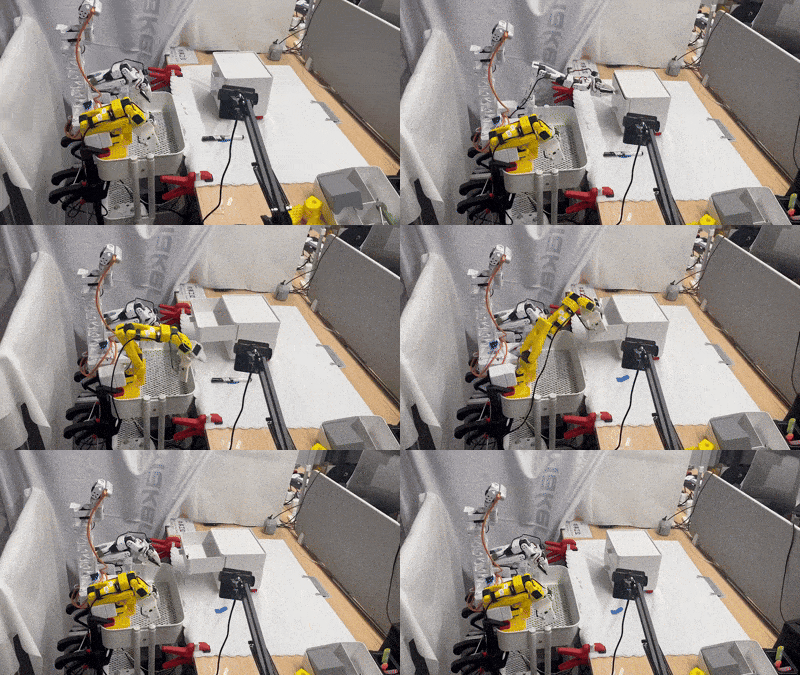
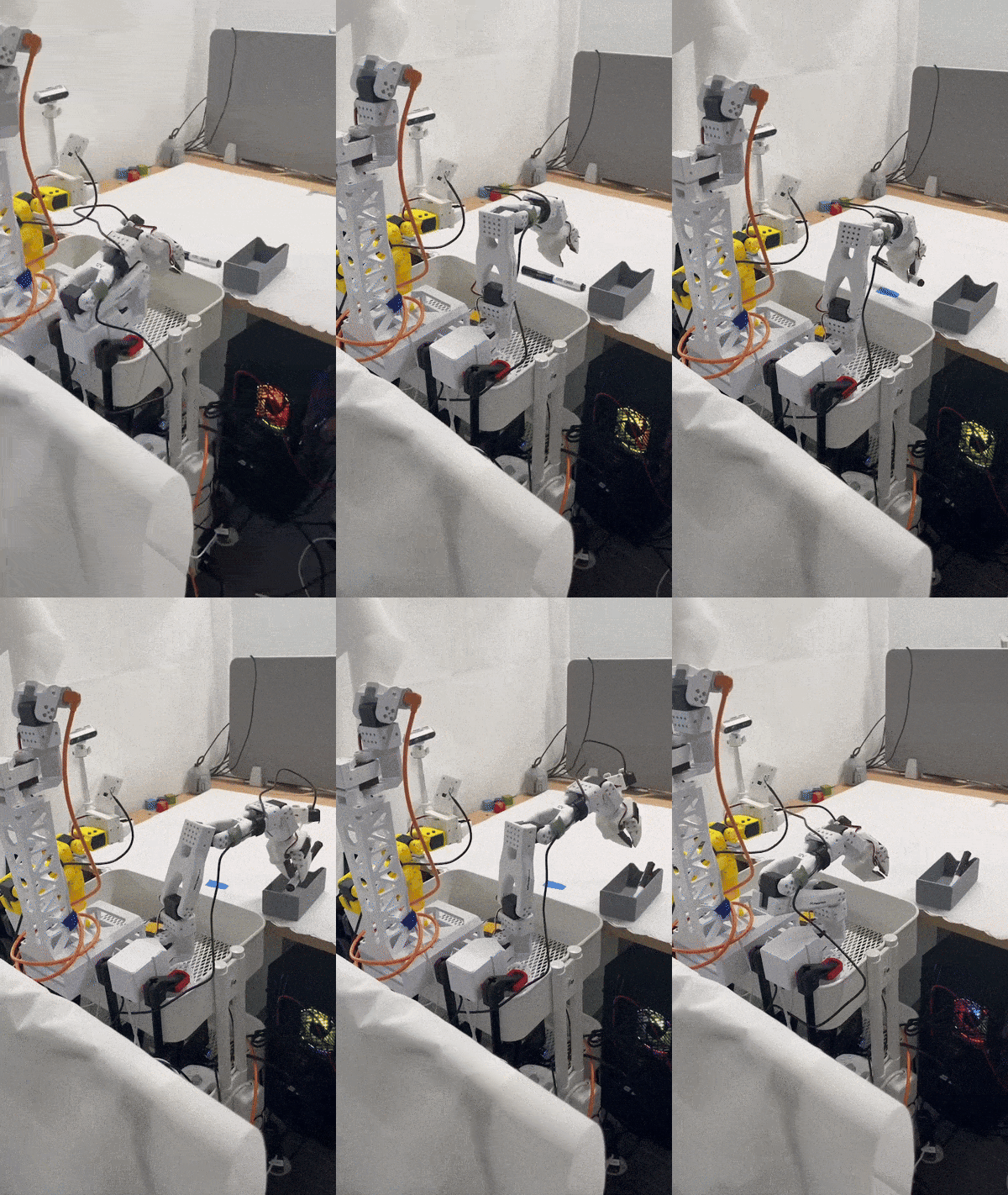
This document explains how to use XLeRobot for:
Training and running SmolVLA with a bimanual SO-101 setup and three-camera data collection
Training and running ACT (Action Chunking with Transformers) policy
Using VR Control for XLeRobot
1) Overview#
XLeRobot is a LeRobot-based setup that adds:
BiSO101Follower (bimanual follower arm)
BiSO101Leader (bimanual teleoperation/leader arm)
Independent control of left/right arms + synchronized bimanual operation
Three-camera recording configuration:
front_camhand_camside_cam
References#
2) Demo Tasks (What SmolVLA Can Learn with ~20 Episodes)#
Demo 1 - Drawer + Pick + Place + Grasp (Bimanual)#
After training on ~20 episodes, XLeRobot can:
Pull open a drawer
Pick an object
Place the object into the drawer
Push the drawer in
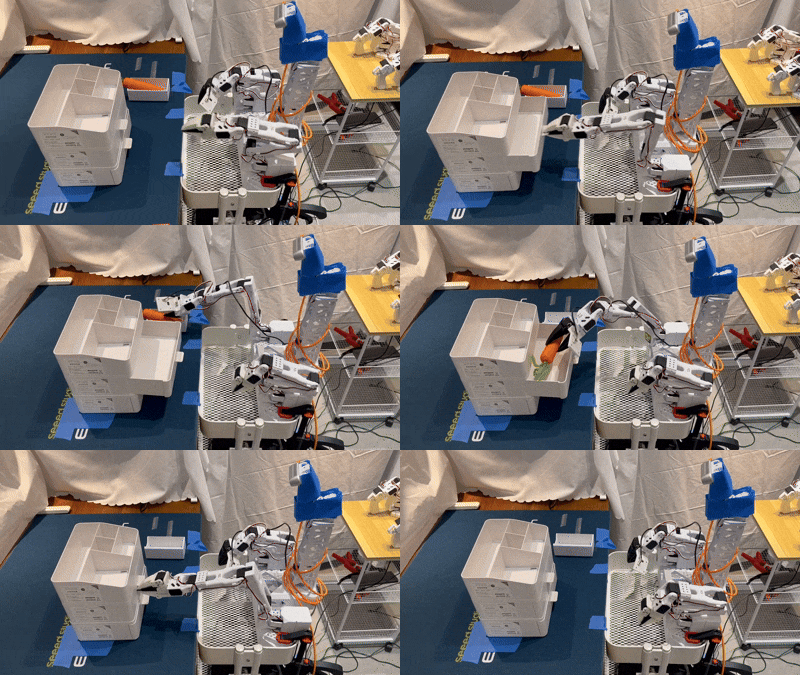
Key aspects:
One-shot grasp of the drawer handle (avoid jitter during data collection)
While the left arm pulls the drawer, the right arm must precisely grasp the object’s center
Accurate one-shot placement into the drawer and smooth “push-in” close
Demo 2 - Pencil Case Zipper (Fine Manipulation)#
After training on ~20 episodes, XLeRobot can:
Grasp the zipper pull tab
Grasp the pencil case handle and stabilize the case
Pull the zipper tab to open the zipper smoothly
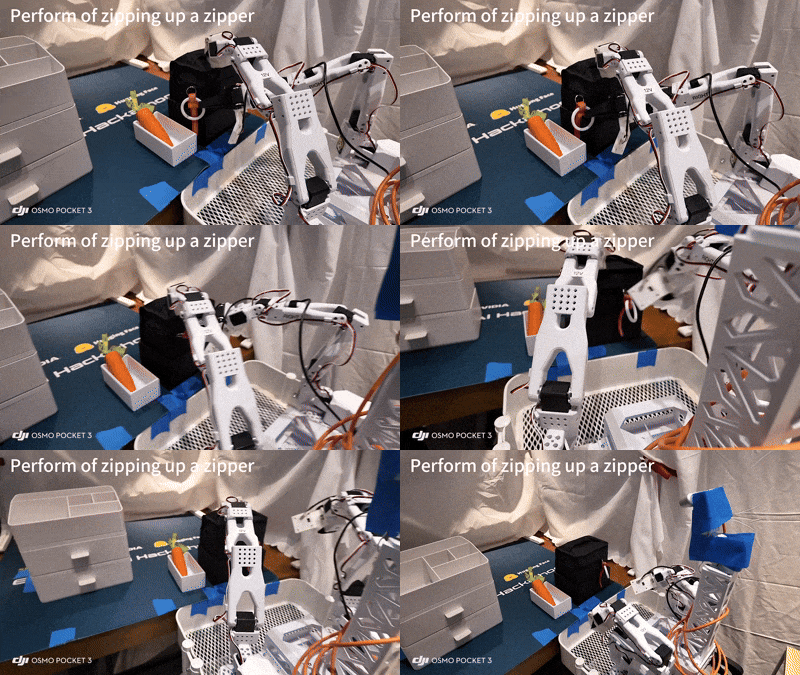
Key difficulties:
The zipper pull is often in a top-down camera blind spot, requiring one-shot grasp (avoid re-grasp)
Maintain consistent pulling height to avoid lifting up/down (no “upward yank” or “downward drag”)
3) Hardware / Configuration Notes#
Camera Placement (Three Cameras)#
Recommended configuration:
front_cam× 1hand_cam× 1side_cam× 1
Note: In practice, consistent camera placement and stable lighting are critical for learning stable manipulation.
Action Dimension Handling (Important)#
A bimanual SO-101 robot has 12 action dimensions:
6 joints × 2 arms = 12
SmolVLA automatically detects and handles action dimensions without manual configuration:
During training: 12-D → padded to 32-D (
max_action_dim)During inference: 32-D → cropped back to original 12-D
Conceptual code path:
# Training: 12D -> pad to 32D
actions = pad_vector(batch[ACTION], self.config.max_action_dim)

# Inference: 32D -> crop back to 12D
original_action_dim = self.config.action_feature.shape[0]  # auto-detected: 12
actions = actions[:, :, :original_action_dim]
Unlike other VLA models (e.g., xVLA) that may require manual action_mode configuration, SmolVLA’s dynamic padding supports any action space ≤ 32D.
4) Installation & Environment Setup (Linux)#
A. Install Miniconda (Example)#
wget https://repo.anaconda.com/miniconda/Miniconda3-latest-Linux-x86_64.sh
bash Miniconda3-latest-Linux-x86_64.sh

# Restart terminal, then verify
conda --version
B. Create & Activate Environment#
conda create -n lerobot python=3.10
conda activate lerobot
Note: Activate this environment every time you use LeRobot/XLeRobot:
conda activate lerobot
C. Install System Dependencies (FFmpeg)#
conda install -c conda-forge ffmpeg
D. Clone Repository & Install Dependencies#
git clone https://github.com/kahowang/lerobot.git
cd lerobot

# Install LeRobot with Feetech motor support (required for SO-101)
pip install -e ".[feetech]"

# Install SmolVLA dependencies
pip install -e ".[smolvla]"
5) Data Collection (Three-Camera, Bimanual Teleop)#
Use lerobot-record to record bimanual demonstrations with three cameras.
Replace ${HF_USER} and your_dataset_name with your Hugging Face username and dataset name.
lerobot-record \
  --robot.type=bi_so101_follower \
  --robot.left_arm_port=/dev/ttyACM0 \
  --robot.right_arm_port=/dev/ttyACM1 \
  --robot.id=bimanual_follower \
  --robot.cameras='{
    "front_cam": {"type": "opencv", "index_or_path": 0, "width": 640, "height": 480, "fps": 30},
    "hand_cam": {"type": "opencv", "index_or_path": 1, "width": 640, "height": 480, "fps": 30},
    "side_cam": {"type": "opencv", "index_or_path": 2, "width": 640, "height": 480, "fps": 30}
  }' \
  --teleop.type=bi_so101_leader \
  --teleop.left_arm_port=/dev/ttyACM2 \
  --teleop.right_arm_port=/dev/ttyACM3 \
  --teleop.id=bimanual_leader \
  --dataset.repo_id=${HF_USER}/your_dataset_name \
  --dataset.single_task="Your task description here" \
  --dataset.num_episodes=50
Parameter Tips#
Ports (
/dev/ttyACM*) must match your actual USB device mappingdataset.single_taskshould be concise but specific (improves reproducibility)For quick iteration, start with 20 episodes and scale up
6) Training Policies#
6.1) Train SmolVLA#
lerobot-train \
  --policy.path=lerobot/smolvla_base \
  --dataset.repo_id=${HF_USER}/your_dataset_name \
  --batch_size=64 \
  --steps=20000 \
  --output_dir=outputs/train/smolvla_three_cameras \
  --job_name=smolvla_training_three_cameras \
  --policy.device=cuda \
  --wandb.enable=true
Notes:
--policy.path=lerobot/smolvla_basepoints to the SmolVLA base policyAdjust
--stepsbased on dataset size and task complexityIf you do not have a GPU, set
--policy.device=cpu(training will be slow)
6.2) Train ACT (Action Chunking with Transformers)#
ACT is an imitation-learning method that predicts short action chunks instead of single steps. It often achieves high success rates with teleoperated data.
Basic Training Command:
python -m lerobot.scripts.train \
  --dataset.repo_id=${HF_USER}/your_dataset_name \
  --policy.type=act \
  --output_dir=outputs/train/act_bimanual_demo \
  --job_name=act_training_bimanual \
  --policy.device=cuda \
  --policy.repo_id=${HF_USER}/act_bimanual_demo \
  --wandb.enable=true
Alternative using lerobot-train:
lerobot-train \
  --policy.type=act \
  --dataset.repo_id=${HF_USER}/your_dataset_name \
  --output_dir=outputs/train/act_bimanual_demo \
  --job_name=act_training_bimanual \
  --policy.device=cuda \
  --wandb.enable=true
Training Notes:
Checkpoints are written to
outputs/train/<job_name>/checkpoints/ACT typically trains in a few hours on a single GPU (~80M parameters)
A checkpoint at 80k steps takes about 1h45 on an Nvidia A100
For Apple Silicon: use
--policy.device=mps
Resume Training from Checkpoint:
python -m lerobot.scripts.train \
  --config_path=outputs/train/act_bimanual_demo/checkpoints/last/pretrained_model/train_config.json \
  --resume=true
7) Inference/Evaluation#
7.1) SmolVLA Inference#
Typical pattern to run policy inference and log evaluation episodes:
lerobot-record \
  --robot.type=bi_so101_follower \
  --robot.left_arm_port=/dev/ttyACM0 \
  --robot.right_arm_port=/dev/ttyACM1 \
  --robot.id=bimanual_follower \
  --robot.cameras='{
    "front_cam": {"type": "opencv", "index_or_path": 0, "width": 640, "height": 480, "fps": 30},
    "hand_cam": {"type": "opencv", "index_or_path": 1, "width": 640, "height": 480, "fps": 30},
    "side_cam": {"type": "opencv", "index_or_path": 2, "width": 640, "height": 480, "fps": 30}
  }' \
  --dataset.single_task="Your task description here" \
  --dataset.repo_id=${HF_USER}/eval_results \
  --dataset.num_episodes=10 \
  --policy.path=${HF_USER}/smolvla_three_cameras
Notes:
--policy.pathshould point to your trained policy checkpoint / uploaded policyeval_resultsis a separate dataset repo for evaluation logs (recommended)
7.2) ACT Inference#
Using lerobot-record:
lerobot-record \
  --robot.type=bi_so101_follower \
  --robot.left_arm_port=/dev/ttyACM0 \
  --robot.right_arm_port=/dev/ttyACM1 \
  --robot.id=bimanual_follower \
  --robot.cameras='{
    "front_cam": {"type": "opencv", "index_or_path": 0, "width": 640, "height": 480, "fps": 30},
    "hand_cam": {"type": "opencv", "index_or_path": 1, "width": 640, "height": 480, "fps": 30},
    "side_cam": {"type": "opencv", "index_or_path": 2, "width": 640, "height": 480, "fps": 30}
  }' \
  --dataset.single_task="Your task description here" \
  --dataset.repo_id=${HF_USER}/eval_act_results \
  --dataset.num_episodes=10 \
  --policy.path=${HF_USER}/act_bimanual_demo
Using python -m lerobot.record:
python -m lerobot.record \
  --robot.type=bi_so101_follower \
  --robot.left_arm_port=/dev/ttyACM0 \
  --robot.right_arm_port=/dev/ttyACM1 \
  --dataset.repo_id=${HF_USER}/eval_act_results \
  --policy.path=${HF_USER}/act_bimanual_demo \
  --episodes=10
Notes:
The policy will execute autonomously on the robot
Evaluation results are saved to the specified dataset repo
Compare evaluation episodes with training demonstrations to assess performance
8) VR Control for XLeRobot#
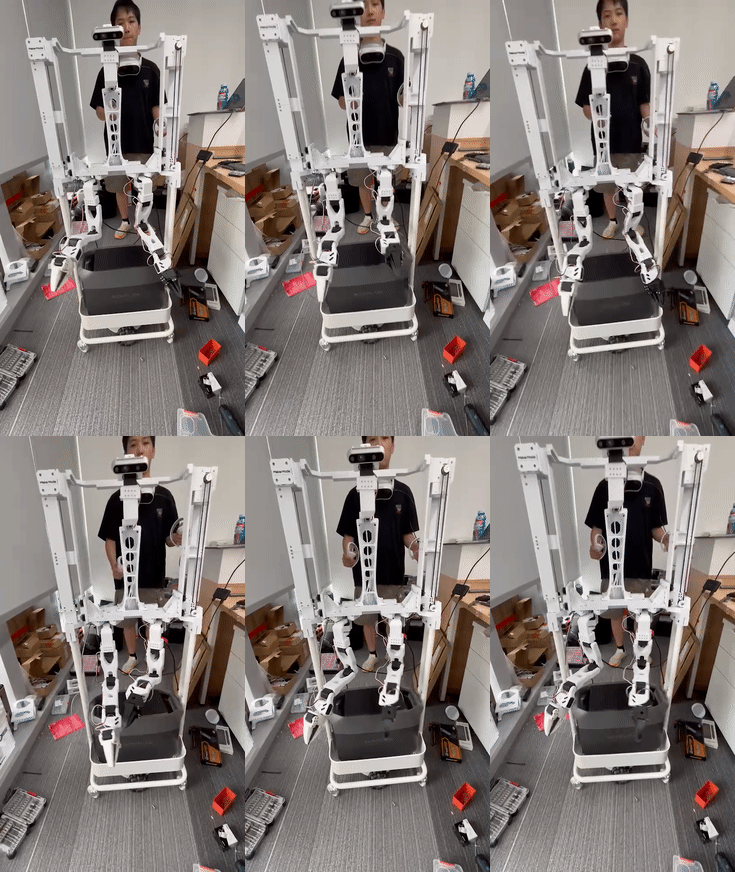
Robot: Rumi#
Rumi is a new-generation bimanual robot with a liftable chassis: Rumi
Repositories#
Features#
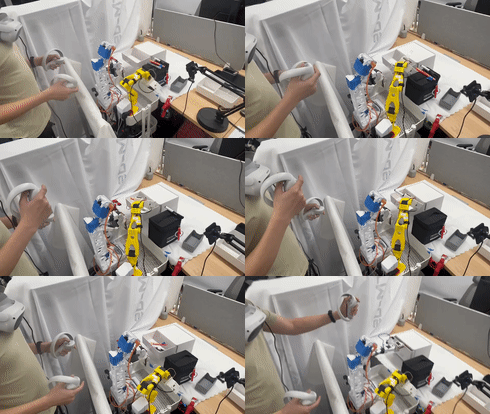
VR → robot arm mapping
Supports:
Inverse kinematics (IK) solving
Joint-space → motor command conversion
XLeRobot integrates ROS 2#
For VR control, follow the repository’s README to configure VR devices, ROS 2 nodes, and robot drivers.
9) Practical Tips / Common Pitfalls#
Data Quality#
Aim for one-shot grasps during demonstrations (avoid micro-corrections)
Keep camera viewpoints consistent between recording and inference
Maintain stable lighting and avoid motion blur
Bimanual Coordination#
For tasks like drawers:
Left arm: stable pulling trajectory
Right arm: precise pick/place with minimal hesitation
Device Ports#
If ports change after reboot, consider using persistent udev rules to stabilize device naming.#
10) Quick Checklist#
[ ]
conda activate lerobot[ ] Three cameras connected and indices correct (0/1/2)
[ ] Follower ports correct (
/dev/ttyACM0,/dev/ttyACM1)[ ] Leader ports correct (
/dev/ttyACM2,/dev/ttyACM3)[ ] Dataset repo ID and task description set
[ ] Training runs on correct device (cuda vs cpu)
[ ] Inference uses the correct trained policy path